

Side by side
| Spreadsheet | Signage software such as Signcensus | |
|---|---|---|
| Sign position | A separate marked-up PDF | A pin on the plan, plus GPS |
| Photos | Files matched to rows by name | Attached to the sign from the phone camera |
| Recording on site | Notes, then typed up later | Filled in on the phone at the sign |
| Consistency | Free text drifts between people | Fixed sign types, statuses and fields |
| Several editors | Copies and versions | One shared record |
| History | None, unless someone keeps it | Every change logged with who and when |
| Sharing with clients | Email attachments | A client login to their own sites |
| Cost | Free | A monthly subscription |
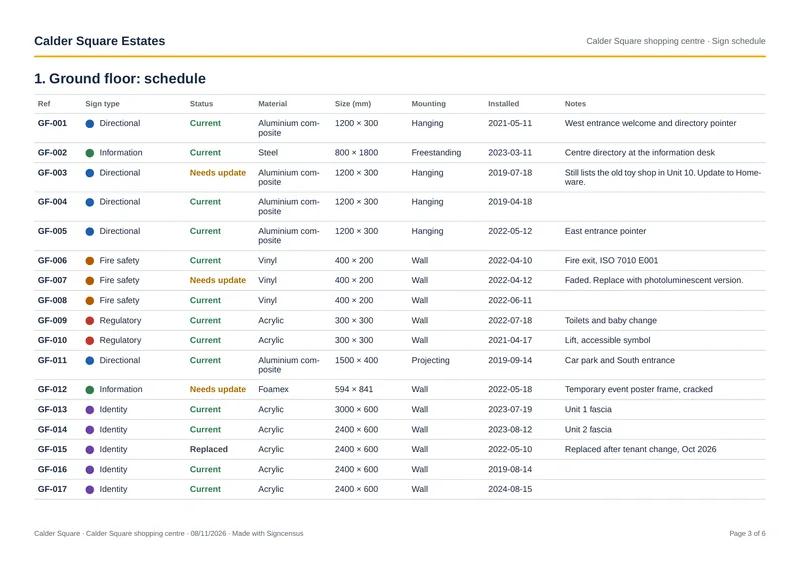
When a spreadsheet is fine
One site, a few dozen signs, one person maintaining it, and no need to share it. Use the free sign schedule template.
When to switch
- You manage several sites or clients.
- More than one person surveys or updates signs.
- You spend more time writing up surveys than doing them.
- Clients or colleagues need to see the record without you sending files.
What to look for in signage software
- Works in a phone browser on site, with the camera and GPS.
- Pins signs to your own plans, not just a street map.
- Lets you set your own sign types and fields.
- Exports the schedule as a spreadsheet, so you're never locked in.
- Keeps a change history, and hosts data in the UK if that matters to your clients.
- Priced per company, not per client viewer.
Questions
- Can I import my existing spreadsheet?
- Talk to us through the contact page about bringing existing records across.